
GPU GUIDE · UPDATED 10 NOVEMBER 2026
Local LLM server: how much GPU memory do you need?
Running large language models on your own hardware keeps data in-house and makes costs predictable. The first question is always the same: how much GPU memory does the model need? This guide gives you the arithmetic, a sizing table and the hardware that matches each tier — from a single 32GB card to an eight-GPU server.
The two numbers that decide GPU memory
1. Model weights. Multiply the number of parameters by the bytes per parameter of the precision you run:
- 16-bit (FP16/BF16): about 2 bytes per parameter;
- 8-bit (FP8/INT8): about 1 byte per parameter;
- 4-bit (for example GPTQ, AWQ or GGUF Q4 formats): about 0.5–0.6 bytes per parameter.
A 70-billion-parameter model therefore needs about 140GB at 16-bit, 70GB at 8-bit and 35–42GB at 4-bit, before anything else is loaded.
2. Context (the KV cache). Every token in the context window keeps keys and values in GPU memory, for every user served at the same time. For a 70B model of the Llama 3 type with grouped-query attention, this is roughly 0.3MB per token at 16-bit — about 10GB for one 32,000-token conversation. Ten users with long contexts can need more memory for the KV cache than for the model itself.
Add a margin of 10–20% for the runtime, activations and memory fragmentation.
Sizing table
Approximate memory for the model weights alone. Leave room for the KV cache and runtime on top.
| Model size | 16-bit | 8-bit | 4-bit |
|---|---|---|---|
| 8B | ~16GB | ~8GB | ~5GB |
| 14B | ~28GB | ~14GB | ~8GB |
| 32B | ~64GB | ~32GB | ~18GB |
| 70B | ~140GB | ~70GB | ~40GB |
| 120B | ~240GB | ~120GB | ~65GB |
| 400B | ~800GB | ~400GB | ~220GB |
| 670B | ~1,340GB | ~670GB | ~370GB |
Mixture-of-experts (MoE) models activate only part of their parameters per token, which makes them faster, but all experts must still be held in memory. Size them by their total parameter count.
Which hardware fits which models
Indicative NodeX prices in US dollars as shown on our website on 10 November 2026; VAT, delivery and availability are confirmed in your written quote.
| GPU memory | Example hardware | Comfortable fit |
|---|---|---|
| 32GB | RTX 5090 32GB ($4,690 per card) | 8B–14B at 8- or 16-bit; 32B-class at 4-bit with a short context |
| 48GB | RTX 4090 48GB ($4,000) or RTX 3090 48GB ($2,000) | 32B-class at 8-bit; 70B at 4-bit with a moderate context |
| 96GB | RTX PRO 6000 Blackwell ($11,900) or 2× 48GB cards | 70B at 8-bit; ~120B MoE at 4-bit |
| 141GB | H200 NVL ($29,490) | 70B at 8-bit with long contexts and many users |
| 192–384GB | 2–4× RTX PRO 6000 in one server | 70B at 16-bit; 120B-class at 8-bit; several models at once |
| 768GB | 8× RTX PRO 6000 server (from $121,384) | 400B-class at 8-bit; 670B-class at 4-bit |
When a model is split across several GPUs (tensor or pipeline parallelism), the GPUs exchange data constantly. Cards without NVLink communicate over PCIe, which works well for inference but adds overhead; see RTX PRO 6000 vs H200 NVL for the trade-offs.
Memory decides what fits; bandwidth decides how fast
For a single user, the speed of text generation is limited mainly by memory bandwidth, because the weights are read for every token. That is why an H200 NVL (4.8 TB/s) generates faster than an RTX PRO 6000 (1.6 TB/s), and why lower precision is also faster: a 4-bit model has a quarter of the bytes to read of a 16-bit one. For many users at once, batching makes compute and the KV cache the limits, and serving software such as vLLM or SGLang uses the GPU far more efficiently than single-user tools.
Planning checklist
-
Pick the models
List the models you will run now and in the next year, at the precision you accept for quality.
-
Estimate the users and context
Concurrent users and context length set the KV cache. Long documents and agents need much more than chat.
-
Add headroom
New models tend to be larger. A server with free slots lets you add GPUs later in the same platform.
-
Plan the room
GPU servers draw kilowatts and are loud. Decide between your premises and colocation early.
Local LLM servers from NodeX
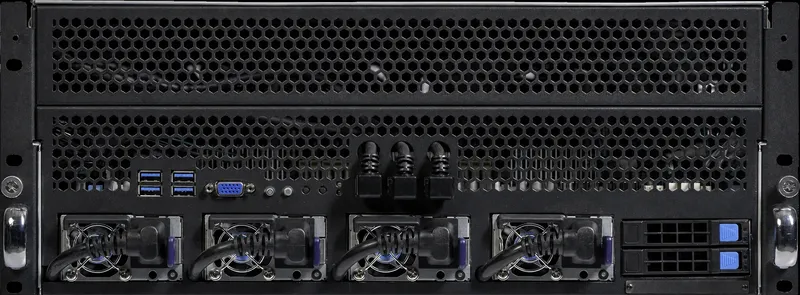
We build GPU servers in Bulgaria for private AI inference, from single 48GB cards to eight-GPU systems, and can arrange colocation and the operating system setup. Tell us the models, users and context lengths you plan for, and we will propose a configuration with a written quotation.
Frequently asked questions
Is 4-bit quantisation good enough?
For many chat and assistant tasks, well-made 4-bit versions of large models perform close to the original, and a larger model at 4-bit often beats a smaller model at 16-bit. For precise tasks such as code or structured extraction, test 8-bit as well before deciding.
Can I combine different GPUs in one server?
Technically yes, but splitting one model across different GPU models is limited by the slowest card and the smallest memory. Identical GPUs are simpler to run and to scale.
Do I need server CPUs and ECC memory?
For a production server, yes: server platforms give enough PCIe lanes for several GPUs at full bandwidth, plenty of memory channels and ECC memory for reliability.
Sources
Specifications and platform details on this page come from the published sources below. Prices come from our configurator on the date shown at the top of the page.